From Painted Cels to Digital Layers: Animation’s Working Surface
Animation working surfaces shape what artists can revise, repeat, and preserve, helping teams choose materials and file structures that suit a scene.
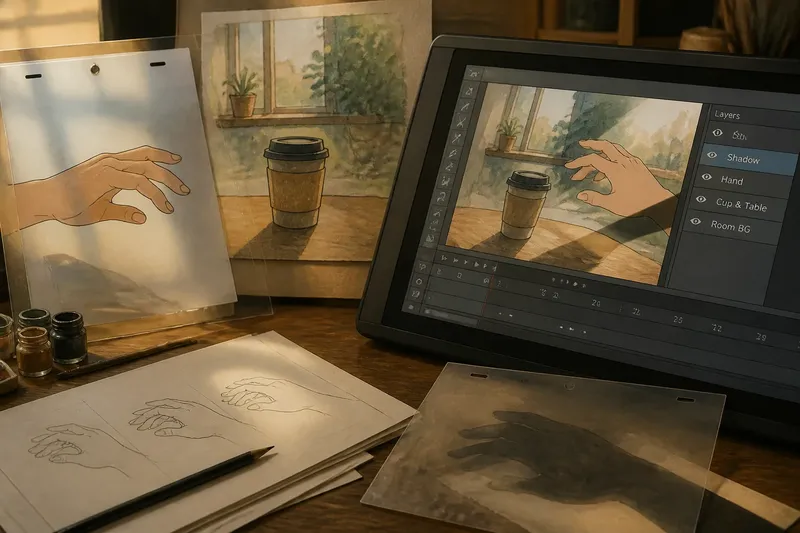
A hand reaches toward a paper cup, pauses, then pulls back as a shadow crosses the table. Animation’s working surface—the material or digital space where images are drawn, painted, and assembled—affects how artists build that moment and what they can change later.
Painted cels, digital layers, and combinations of the two can all support expressive work. The useful choice depends on what must remain fixed, what needs to move, and what might change during review.
Movement and stillness
Before choosing materials, separate the scene into elements that change and elements that stay put. A moving hand may need a new drawing for each pose, while a tabletop can remain unchanged beneath it. A shadow may move independently, or it may be part of the background if the scene does not require separate control.
This distinction shapes the workload. Keeping a still element available for reuse avoids redrawing it, while separating a moving element can make a targeted revision easier. More separation is not automatically better: every extra piece needs to be tracked and assembled consistently.
For the cup scene, the central visual task is making the hesitation legible. Artists might keep the cup and table in a painted background, then animate the hand above them. The shadow’s treatment depends on whether its movement needs to be adjusted independently.
Painted cels
In cel animation, artists draw and paint moving elements on transparent sheets called cels, then photograph or otherwise capture them against a background. The transparent surface allows the setting to show through around the drawn figure, so a background can be reused while the action changes.
The physical pieces make the image’s assembly tangible. Painted texture and small irregularities can remain visible, and their appearance can be part of the intended style. A revision, however, may require preparing or repainting a piece and checking that it aligns with the other elements.
For the cup scene, the hand could be painted on cels over a background showing the table and cup. If the shadow also moves, it could be painted on a separate cel. That arrangement gives each moving element a distinct physical surface, but the artist must keep their placement and edges coherent from frame to frame.
Digital layer structure
Digital animation files can keep parts of an image on separate layers, such as a background, character, or shadow. Artists may draw directly in a digital canvas or scan artwork made on paper. Layer controls and workflows vary among programs, versions, and project setups, so a team should check its own software documentation and file format before relying on a particular feature.
Programs such as Toon Boom Harmony, Adobe Animate, and Krita support digital image-making, though they do not all organize animation in the same way. The practical question is not simply which program is available; it is whether the chosen setup lets artists preserve the elements they need to adjust and deliver the work in the required format.
A useful file structure follows meaningful parts of the scene. If the hand and shadow need separate changes, keeping them apart can help. If the cup never moves and belongs visually to the setting, it may be simpler to leave it with the background. Flattening everything into one image can limit targeted changes, while splitting every small mark into its own layer can make the file hard to manage.
Choosing an animation surface
Compare options by the kind of revision or visual character the scene requires, rather than assuming one method is inherently superior.
- Painted cels: Observe whether physical paint texture and the assembled look are central to the intended image. If they are, use cels and plan to align separate pieces carefully; if not, consider a digital or mixed workflow that better suits the needed revisions.
- Digital layers: Check whether the hand, shadow, or other elements need independent edits. If they do, keep those elements separate and name them clearly; if they do not, group related artwork to keep the file manageable.
- Scanned artwork: Observe whether paper texture or hand-drawn marks are important to the scene. If they are, scan or photograph the artwork and check that it remains legible in the composition; if they are not, drawing directly in the project may avoid an unnecessary conversion step.
- Revision needs: Check what the director or editor may ask to change, such as the shadow’s edge or the hand’s position. If one element is likely to change independently, separate it where the chosen workflow allows; if several elements must move together, keep them linked or grouped.
- File handoff: Check the required file type, color handling, and naming conventions with the receiving team. If the project can be opened and interpreted as expected, continue with that setup; if not, agree on a compatible export or interchange format before producing more work.
- Visual consistency: Compare a representative frame for line, color, and texture. If the elements read as part of one scene, proceed with the chosen treatment; if they clash, adjust the artwork or compositing approach before continuing.
Say an invented studio has a scanned watercolor room, a hand that moves independently, and a shadow that must pass across the fingertips. The artists place the room and cup together in the background, import the scan into their chosen animation setup, and draw the hand and shadow as separate elements. In a review frame, the shadow covers the fingertips; they alter the shadow’s edge without redrawing the hand. The observable result is that the pause remains visible while the watercolor setting stays intact. If the scan does not sit naturally beside the digital drawing, they can adjust its color treatment or redraw the affected element by hand, accepting the extra work in exchange for a closer match.
Questions about animation surfaces?
What is a cel in animation?
A cel is a transparent sheet used to draw or paint an element that can be placed over a background. It allows artists to change the foreground action while reusing the setting.
How do digital layers help animators?
Layers keep parts of an image separate, which can make some element-specific revisions easier. Their value depends on the software setup and on whether the file is organized around meaningful parts of the scene.
Can paper drawings be used in digital animation?
Yes. Artists can scan or photograph drawings and bring them into a digital composition, then combine them with other artwork if the project’s tools and file setup support that workflow.
Is digital animation always easier to revise?
No. A well-organized layered file can make targeted changes straightforward, but a flattened or crowded file may make them awkward. The requested change and the project’s setup both matter.
Surface and storytelling
A working surface shapes which parts of an image can be reused, separated, or altered without disturbing the rest. That practical structure can affect how clearly a pause, gesture, or shift in the scene reaches the audience.
For animation working surfaces, begin by identifying what stays still, what moves, and what may need revision. Then choose materials and file organization that preserve the intended look while keeping the likely changes manageable.